
New images - 2026.11.1
It's been almost three weeks since the last live-usb image release. A lot happened in between, so it's time for new images. All five are on the Download page. The older images are still in the archive, if you need them.
The Plasma Desktop is now directly installable
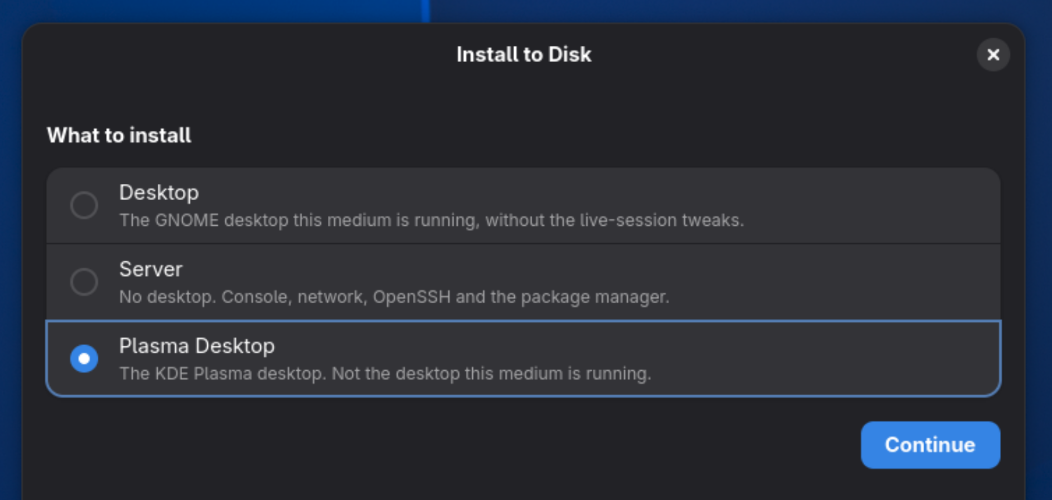
The installer now can directly install the Plasma Desktop
The live USB still boots into GNOME. But the installer now lets you pick Plasma as the desktop instead, with the new Plasma Login Manager in place of SDDM. It installs the +plasma and +plasma-login sets, and you can always add or remove either desktop afterwards with pkg.
A quiet boot
This is the first image with lowerthird. I wrote about why: I like a clean startup screen, but I don't want Plymouth.
So now you get the firmware logo, one line of text telling you which kernel is booting, and then the login screen. No kernel messages. The boot menu is hidden, with a 2 second timeout. Press Esc to get it back (boot-manager.toml(5) shows how to make that permanent). Shutdown looks the same: the logo, and a line saying the system is shutting down. The mouse cursor is gone too.
Both the live medium and desktop installs boot this way. The ISO images don't, on purpose.
What else is new
This isn't everything. The weekly posts have the full lists (week 8, week 9). The highlights that directly affect the image content are:
- Linux-kernel-stable 7.2.15, linux-firmware 20261019.
- DKMS works, so you can install the proprietary NVIDIA driver now. User tested.
- Plasma 6.8.1, and the Plasma Login Manager, directly installable.
- Fingerprint login, in both GNOME and Plasma.
- A significant amount of fixes and changes to
pkg, as expected. Highlights are a better user experience (collapsed lists, better progress displays, caching of payloads for local builds), and some improved security aspects to mitigate incorrect key rollback (pkgonly trusts keys forward from its pinned root key).pkgnow also trusts theca-trustgenerated trust store, instead of a built-in CA root list. This will allow us to revoke CAs faster and easier in the future.
Already installed? You don't need a new image. pkg upgrade gets you all of the package changes. Plasma was already installable. lowerthird can be installed and enabled through boot-manager.toml as well on existing systems.
As always, I'd love to hear how it goes. Come tell us on Discord.
--sofar (aka Auke)